Configuring apps with compilation environment declarations
You can specify compilation environment declarations when building or running a Dart application. Compilation environment declarations specify configuration options as key-value pairs that are accessed and evaluated at compile time.
Your app can use the values of environment declarations to change its functionality or behavior. Dart compilers can eliminate the code made unreachable due to control flow using the environment declaration values.
You might define and use environment declarations to:
- Add functionality during debugging, such as enabling logging.
- Create separate flavors of your application.
- Configure application behavior, such as the port of an HTTP server.
- Enable an experimental mode of your application for testing.
- Switch between testing and production backends.
To specify an environment declaration when running or compiling a
Dart application, use the --define option or its
abbreviation, -D. Specify the declaration key-value
pair using a <NAME>=<VALUE> format:
$ dart run --define=DEBUG=true -DFLAVOR=freeTo learn how to set these declarations with other tools, check out the specifying environment declarations section in this guide. That section explains the declaration syntax and how to specify them on the command line and in IDEs and editors.
Accessing environment declarations
#
To access specified environment declaration values, use one of the
fromEnvironment constructors with const or
within a constant context. Use
bool.fromEnvironment
for true or false values,
int.fromEnvironment
for integer values, and
String.fromEnvironment
for anything else.
Each of the fromEnvironment constructors require the
name or key of the environment declaration. They also accept an
optional defaultValue named argument to override the
default fallback value. The default fallback value is used when a
declaration isn't defined or the specified value cannot be parsed as
the expected type.
For example, if you want to print log messages only when the
environment declaration DEBUG is set to
true:
void log(String message) {
  // Log the debug message if the environment declaration 'DEBUG' is `true`.
  // If there was no value specified, do not log.
  if (const bool.fromEnvironment('DEBUG', defaultValue: false)) {
    print('Debug: $message');
  }
}
In this snippet, if DEBUG is set to
false during compilation, or not specified at all,
production compilers can completely remove the condition and its
body.
The fromEnvironment constructors fallback to a default
value when the declaration isn't specified or the specified value
cannot be parsed. Therefore, to specifically check whether an
environment declaration has been specified, use the
bool.hasEnvironment
constructor:
if (const bool.hasEnvironment('DEBUG')) {
  print('Debug behavior was configured!');
}
Specifying environment declarations
#Dart CLI
#
Both dart run and the
dart compile subcommands accept any number of the
-D or --define options to specify
environment declaration values.
$ dart run --define=DEBUG=true -DFLAVOR=free main.dart
$ dart compile exe --define=DEBUG=true -DFLAVOR=free main.dart
$ dart compile js --define=DEBUG=true -DFLAVOR=free main.dart
$ dart compile aot-snapshot --define=DEBUG=true -DFLAVOR=free main.dart
$ dart compile jit-snapshot --define=DEBUG=true -DFLAVOR=free main.dart
$ dart compile kernel --define=DEBUG=true -DFLAVOR=free main.dart
webdev
#
To learn about configuring webdev to pass environment
declarations to both the development and production web compilers,
check out
the webdev configuration documentation.
Visual Studio Code
#
In your launch configuration (launch.json) under
configurations, add a new toolArgs key
containing the your desired environment declarations:
"configurations": [
    {
        "name": "Dart",
        "request": "launch",
        "type": "dart",
        "toolArgs": [
          "--define=DEBUG=true"
        ]
    }
]
To learn more, check out the documentation for VS Code launch configurations.
JetBrains IDEs
#In the Run/Debug Configurations for your project, add your desired environment declarations to VM options:
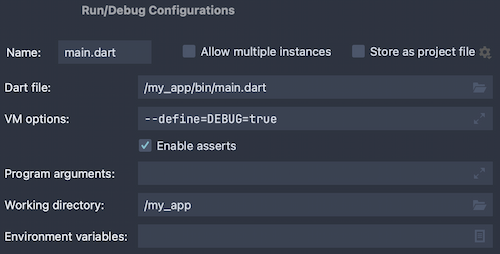
To learn more, check out JetBrains' documentation for Dart Run/Debug Configurations.
Flutter
#
To specify environment declarations to the Flutter tool, use the
--dart-define option instead:
$ flutter run --dart-define=DEBUG=true除非另有说明,文档之所提及适用于 Dart 3.6.0 版本,本页面最后更新时间: 2024-11-17。 查看文档源码 或者 报告页面问题。