Dart 2.18: Objective-C & Swift interop
Enhanced interoperability, platform-specific networking, improved type inference, and an important update on our null safety language…

Enhanced interoperability, platform-specific networking, improved type inference, and an important update on our null safety language roadmap
#Dart 2.18 is available today. This release features a preview of Objective-C & Swift interoperability and a new iOS/macOS networking package built on top of this interop. It also contains improved type inference for generic functions, performance improvements to async code, new pub.dev features, and cleanup of our tools and core libraries.
Finally, we have the latest null safety migration status numbers and an important roadmap update on our path towards a fully null safe Dart. Please read to the end!
Introducing Dart to Objective-C & Swift interop
#
We previewed the Dart foreign function interface (FFI) for
calling native C APIs in 2020 and released it in Dart 2.12
in March 2021. Since that release, a large selection of
packages have taken advantage of this feature to integrate
with existing native C APIs. A few examples include
file_picker,
printing,
win32,
objectbox,
realm,
isar,
tflite_flutter, and
dbus.
The Dart team wants Dart to support interoperability with all the primary languages on the platforms where Dart runs. Dart 2.18 meets the next milestone toward that goal. Your Dart code can call Objective-C and Swift code, as typically used for APIs on the macOS and iOS platforms. Dart supports this interop mechanism in any app from the CLI app to backend code to a Flutter UI.
This new mechanism utilizes the fact that Objective-C and
Swift code can be exposed as C code based on API bindings.
The Dart API wrapper generation tool,
ffigen, can create these bindings from API headers. Let’s take a
look at an example.
Time Zone example using Objective-C
#
macOS has an API for querying time zones information exposed
on the
NSTimeZone class. You can query this API for the time zone and
UTC time zone offset
that the user has configured for their device.
The following example Objective-C app uses this timezone API to get the system time zone and the GMT offset:
#import <Foundation/Foundation.h>

int main(int argc, const char * argv[]) {
    @autoreleasepool {
        NSTimeZone *timezone = [NSTimeZone systemTimeZone]; // Get current time zone.
        NSLog(@"Timezone name: %@", timezone.name);
        NSLog(@"Timezone offset GMT: %ld hours", timezone.secondsFromGMT/60/60);
    }
    return 0;
}
The app imports Foundation.h, which contains
the API headers for the Apple Foundation library. Next,
inside the main method, it calls the
systemTimeZone method from the
NSTimeZone class. This method returns an
NSTimeZone instance with the selected time zone
on the device. Finally, the app outputs two lines to the
console containing the name of the time zone and the UTC
offset in hours.
If you run this app, it should return something resembling the following, depending on your location:
Timezone name: Europe/Copenhagen
Timezone offset GMT: 2 hours
Time Zone example using Using Dart
#Let’s replicate this result with Dart using the new Objective-C interop.
First create a new Dart CLI app:
$ dart create timezones
Then edit your pubspec file to contain the
ffigen configuration. This configuration points
to the header file and lists which Objective-C interfaces
should generate wrappers:
ffigen:
  name: TimeZoneLibrary
  language: objc
  output: "foundation_bindings.dart"
  exclude-all-by-default: true
  objc-interfaces:
    include:
      - "NSTimeZone"
  headers:
    entry-points:
      - "/Library/Developer/CommandLineTools/SDKs/MacOSX.sdk/System/Library/Frameworks/Foundation.framework/
         Headers/NSTimeZone.h"
This selects Objective-C bindings for the headers in
NSTimeZone.h and includes just the APIs in the
NSTimeZone interface. To generate the wrappers,
run ffigen:
$ dart run ffigen
This command creates a new file,
foundation_bindings.dart, that contains a bunch
of generated API bindings. Using this binding file, we can
write our Dart main method. This method mirrors
the Objective-C code:
void main(List<String> args) async {
const dylibPath =
'/System/Library/Frameworks/Foundation.framework/Versions/Current/Foundation';
final lib = TimeZoneLibrary(DynamicLibrary.open(dylibPath));
final timeZone = NSTimeZone.getLocalTimeZone(lib);
if (timeZone != null) {
print('Timezone name: ${timeZone.name}');
print('Offset from GMT: ${timeZone.secondsFromGMT / 60 / 60} hours');
}
}
That’s it! This new support is available in an experimental state starting with today’s Dart 2.18. This boosts Dart’s general interop support to call macOS and iOS APIs directly. This, in turn, supplements Flutter’s plugins, with new support that works in any Dart app, and that allows you to call macOS and iOS APIs directly from Dart code.
We welcome your feedback. Let us know what worked, what might be changed, or what problems you experienced by commenting in the feedback issue on GitHub. To learn more about this interoperability, see the Objective-C and Swift interoperability guide.
Platform-specific http libraries
#
Dart includes a general, multi-platform
http library. This library allows you to write
code without concern for platform specifics. On occasion,
you might want to write code specific to a particular host
platform’s networking APIs.
For example, Apple’s networking library
NSURLSession
allows specifying WiFi-only networking or that it requires a
VPN. To support these use cases, we’ve created a new
networking package intended for the macOS and iOS platforms,
cupertino_http. This builds on the new Objective-C interop mentioned in
the previous section. It uses a large set of API wrappers
generated
from Apple’s networking APIs in Foundation.
Cupertino http library example
#
The following example sets a Flutter app’s http client to
use the cupertino_http library on macOS and iOS
and Dart’s regular http library from dart:io on
other platforms:
late Client client;
if (Platform.isIOS || Platform.isMacOS) {
  final config = URLSessionConfiguration.ephemeralSessionConfiguration()
    ..allowsCellularAccess = false
    ..allowsExpensiveNetworkAccess = false;
  client = CupertinoClient.fromSessionConfiguration(config);
} else {
  client = Client(); // Uses an HTTP client based on dart:io
}
After this initial configuration, the app makes any
subsequent networking calls on the specific client. For
example, an http
get() request now resembles this:
final response = await get(
  Uri.https(
    'www.googleapis.com',
    '/books/v1/volumes',
    {'q': 'HTTP', 'maxResults': '40', 'printType': 'books'},
  ),
);
When you cannot use the common client interface, you can
call Apple’s networking APIs directly using the
cupertino_http library:
final session = URLSession.sessionWithConfiguration(
URLSessionConfiguration.backgroundSession('com.example.bgdownload'),
onFinishedDownloading: (s, t, fileUri) {
actualContent = File.fromUri(fileUri).readAsStringSync();
});
final task = session.downloadTaskWithRequest(
URLRequest.fromUrl(Uri.https(...))
..resume();
Platform-specific networking in multi-platform apps
#
As we designed this feature, the goal remained to keep apps
as multi-platform as possible. To meet this goal, we kept
our general multi-platform
http API set for basic http operations, and
allowed for configuring per-platform which networking
library to use. You can minimize the amount of
platform-specific code that you need to write by using the
package:http Client API. This API can be configured per-platform but used in a
platform-independent manner.
Dart 2.18 offers experimental support of two
platform-specific http libraries that support the
package:http
Client API:
-
cupertino_httpbased onNSURLSessionfor macOS/iOS. -
cronet_httpbased on Cronet, the networking library popular on Android.
Combining a common client API with several HTTP implementations gives you the best of both worlds. You can get platform-specific behavior while still maintaining your apps from a single set of shared sources for all your platforms. We’d love to hear your feedback on this GitHub issue.
Improved type inference
#
Dart uses many generic functions. Consider the
fold
method, which reduces a collection of elements to a single
value. The following example calculates the sum of a list of
integers:
List<int> numbers = [1, 2, 3];
final sum = numbers.fold(0, (x, y) => x + y);
print('The sum of $numbers is $sum');
With Dart 2.17 or earlier, this method returns a type error:
line 2 • The operator '+' can't be unconditionally invoked
         because the receiver can be 'null'.
Dart’s type inference couldn’t flow information between the
arguments. This resulted in uncertainty of the type of
x. To remedy the potential error, you needed to
specify the type:
final sum = numbers.fold(0, (int x, int y) => x + y);
Dart 2.18 improves type inference. The previous example passes static analysis and can infer that both x and y are non-nullable ints. This change allows you to write more concise Dart code while retaining the full soundness properties of the strongly inferred types.
Async performance improvements
#
This version of Dart improves how the Dart VM applies the
async method and the async*/sync*
generator functions. This reduces code size. On two large
internal Google apps, we saw a reduction of the AOT snapshot
size of around 10%. We also saw a performance increase
across our microbenchmarks.
These changes include additional small behavior changes; to learn more, see the changelog.
pub.dev improvements
#
In conjunction with the 2.18 release, we’ve made two changes
on the pub.dev package repository.
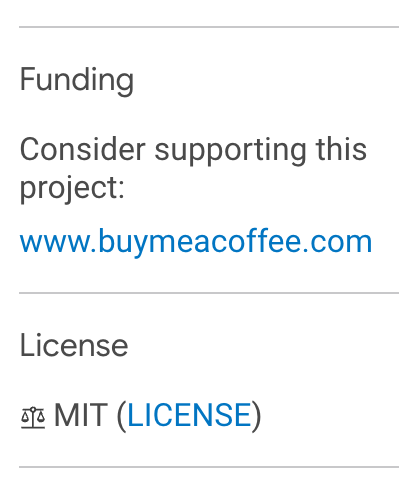
Individuals often maintain packages published on
pub.dev in their spare time. This can be
costly, both in terms of time and finances. To facilitate
sponsorships we now support a new funding tag
in the pubspec, which can be used by package
publishers to list links to one or more ways of sponsoring
the package. These links are then shown on
pub.dev in the sidebar:
To learn more, see the
pubspec documentation.
Furthermore, we’d like to encourage a rich ecosystem of open
source packages. To highlight this, the automated package
scoring on
pub.dev awards an additional 10 points for
packages that use an
OSI approved license.
A few breaking changes
#Dart has a strong focus on simplicity and learnability. We’re constantly trying to keep a careful balance when adding new capabilities. One method to keep things simple is to remove historic functionality and APIs with little use or better replacements. Dart 2.18 cleans up items in this category, including a few smaller breaking changes:
-
We added the unified
dartCLI developer tool back in October 2020. In 2.18, we completed the transition. This release removes the last two deprecated toolsdart2js(usedart compile js) anddartanalyzer(usedart analyze). -
With the introduction of language versioning,
pubgenerates a new resolution file:.dart_tool/package_config.json.The previous file,.packages, used a format that couldn’t contain versions. We discontinued using the.packagesfile. If you have any.packagesfiles, you can delete them. -
Mixins of classes that don’t extend
Objectcan’t be used (breaking change #48167). This behavior was never intended. -
The
uriproperty ofdart:io’sRedirectExceptionhas been changed to nullable (breaking change #49045). -
Constants in
dart:io’s networking APIs following the SCREAMING_SNAKE convention have been removed (breaking change #34218; previously deprecated). Use the corresponding lowerCamelCase constants instead. -
The Dart VM no longer restores the initial terminal settings upon exit. Programs that change the
StdinsettingslineModeandechoModeare now responsible for restoring the settings upon program exit (breaking change #45630).
Null safety update
#We’re very pleased to see the wide usage of null safety since its beta release in November 2020 and the Dart 2.12 release in March 2021.
First, app developers of most all the popular packages on
pub.dev migrated to null safety. Analysis shows
that 100% of the top-250 and 98% of the top-1,000 most used
packages support null safety.
Second, most app developers work in codebases with full null
safety migration. This is crucial. Dart’s full
sound null safety
doesn’t kick in until you migrate all code and all
dependencies (including transitive). We’re tracking this via
telemetry from flutter run commands.
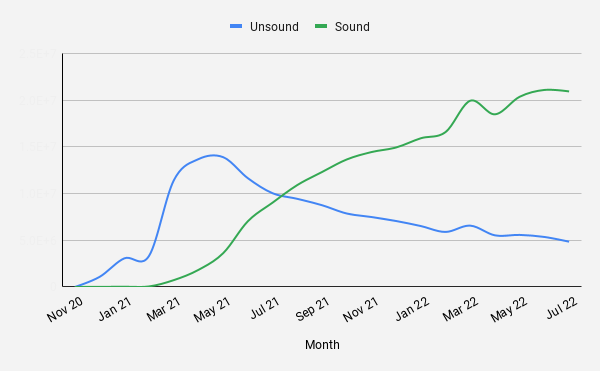
The following graph shows the unsound vs. sound null safety
executions of flutter run. Before the
introduction of null safety, there were none of either. A
rapid growth of unsound null safety followed. As apps
started migrating to null safety, the developers made a
partial migration. Some parts still needed to be migrated.
Over time, we see a very healthy growth of sound null safety
sessions. By the end of last month, there were four times
more sound null safety sessions compared to unsound ones. We
hope that, over the next few quarters, we’ll see the sound
null safety approach 100%!
An important null safety roadmap update
#Supporting both unsound and sound null safety adds overhead and complexity.
First, Dart developers need to learn and understand both modes. Whenever reading a piece of Dart code, check the language version to see if types are non-null by default (Dart 2.12 and later) or nullable by default (Dart 2.11 and earlier).
Second, supporting both modes in our compilers and runtimes slows down evolving the Dart SDK to support new features.
Based on the overhead of unsound null safety and the very positive adoption numbers mentioned in the previous section, it’s our aim to transition to only supporting sound null safety and discontinue non-null safety and unsound null safety modes. We’ve tentatively slated this for release by mid-2023.
This would mean that discontinuing support for Dart 2.11 and
earlier. Pubspec files with an SDK constraint having a lower
bound of less than 2.12 would no longer resolve in Dart 3
and later. In source code containing language markers, those
would fail if set to less than 2.12 (such as// @dart=2.9).
If you’ve migrated to sound null safety, your code will work with full null safety in Dart 3. If you haven’t, please migrate now! To learn more about these changes, see this GitHub issue.
Summary
#
The new support for interop, networking, type inference, and
pub.dev is available today. To get started, you
can directly download the
Dart 2.18 release,
or get it embedded as part of today’s
Flutter 3.3
SDK release.